Staking Q Tokens to the Root Node Panel
Finally, this guide will show you step-by-step how to stake your Q tokens.
Navigate to the Q HQ: Your HQ
On the top bar of the page, ensure that you are connected to the mainnet, not the testnet. Connect with your MetaMask Wallet and root node account.
In the menu section on the left side of the page, click on
Staking.Under
Staking, ensure you're in theRoot Node Stakingsection, not theValidator Node StakingorDelegator Stakingsection.To stake, click on the arrow key pointing down as indicated in the screenshot, and then click on
Stake to Panelin the dropdown menu.
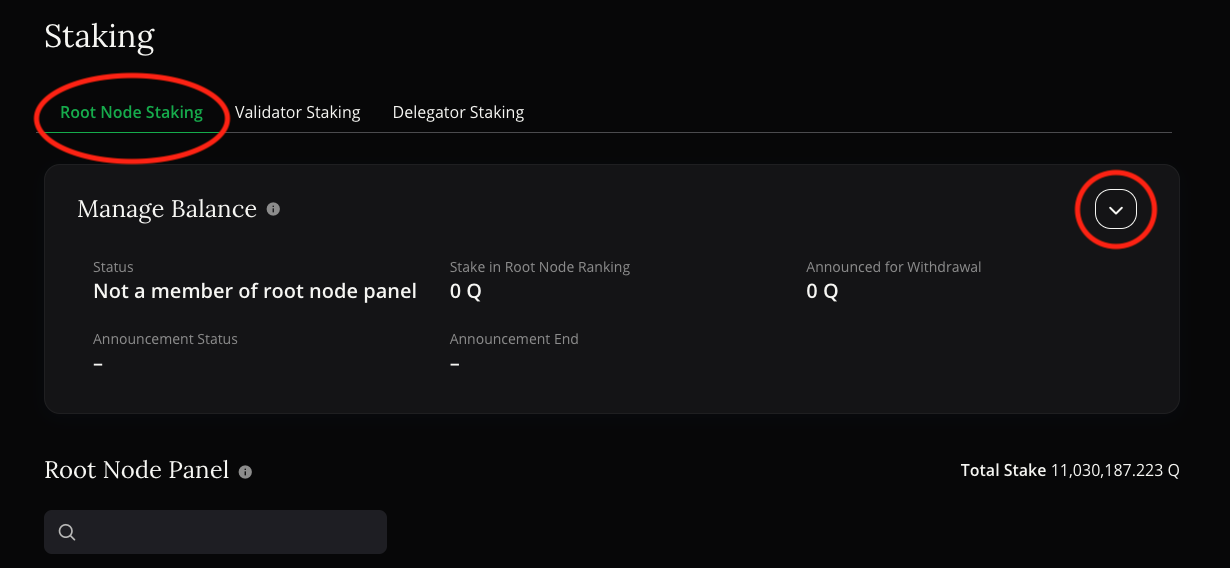
- A pop-up will appear. Define the amount you want to stake to the root node panel and click
Confirm. You might want to retain a few Q tokens to pay for future transactions. MetaMask will prompt you to confirm the transaction, which will require a small gas fee.
Congratulations! You've successfully staked Q tokens to the root node panel. You can check your Staked Amount in the root node panel list at the bottom of the page. Ensure you repeat this process regularly—for example every two weeks—to comply with your Staking Agreement as outlined in your root node adding proposal.
FAQ
Q: Can I get my staked Q tokens back?
A: Yes, you can! To retrieve your staked Q tokens, you first need to announce the withdrawal of the Q tokens you wish to reclaim. After a certain Q Token Time Lock Period as specified in Part B of Appendix 6 in the Q Constitution, you can finally withdraw the announced Q tokens from the root node panel. A more detailed step-by-step guide will be provided shortly.